Langchain多任务处理
Langchain多任务工具链组合设计。用到的tools(serpApi,llm-math)。使用LCEL构建任务链。 ReAct框架:使用LangChain的ReAct框架,允许代理执行思考-行动-观察的循环:
- 思考:分析任务,确定下一步行动
- 行动:调用适当的工具
- 观察:分析工具返回的结果
- 重复:根据观察结果继续思考,直到任务完成
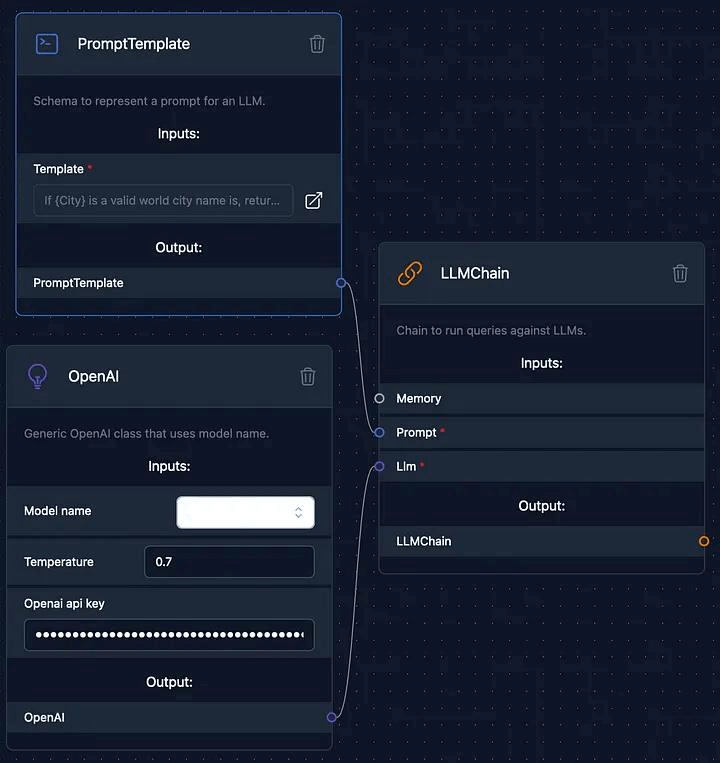
一、使用prompt & llm
from langchain.prompts import PromptTemplate
from langchain_community.llms import Tongyi  # 导入通义千问Tongyi模型
import dashscope
import os

# 从环境变量获取 dashscope 的 API Key
api_key = "sk-3fe85fd028ca4b1f44"
dashscope.api_key = api_key

# 加载 Tongyi 模型
llm = Tongyi(model_name="qwen-turbo", dashscope_api_key=api_key)  # 使用通义千问qwen-turbo模型

# 创建Prompt Template
prompt = PromptTemplate(
    input_variables=["product"],
    template="What is a good name for a company that makes {product}?",
)

# 新推荐用法:将 prompt 和 llm 组合成一个"可运行序列"(串行)
chain = prompt | llm

# 使用 invoke 方法传入输入
result1 = chain.invoke({"product": "软件开发"})
print(result1)

# result2 = chain.invoke({"product": "广告设计"})
# print(result2)
展开查看log
### English Names:
1. **CodeNova** – Suggests new, innovative code solutions.
2. **SoftSprint** – Implies speed and agility in software development.
3. **DevCraft** – Highlights craftsmanship in development.
4. **InnoSoft Labs** – Emphasizes innovation in software.
5. **Apex Code** – Conveys top-tier, high-performance development.
6. **NexGen Systems** – Suggests next-generation technology.
7. **LogicBridge** – Represents connecting ideas through smart software.
8. **Vertex Development** – Implies peak performance and precision.

### Bilingual or Chinese-Friendly Names:
1. **智码科技 (Zhì Mǎ Kējì)** – "Smart Code Technology" – blends intelligence and coding.
2. **云创软件 (Yún Chuàng Ruǎnjiàn)** – "Cloud Innovation Software" – great if you focus on cloud-based solutions.
3. **码力无限 (Mǎ Lì Wúxiàn)** – "Limitless Coding Power" – energetic and modern.
4. **软通未来 (Ruǎn Tōng Wèilái)** – "Software Connecting the Future."
5. **启点科技 (Qǐ Diǎn Kējì)** – "Starting Point Technology" – ideal for startups or innovative teams.

### Tips for Choosing:
- Keep it short and easy to pronounce.
- Check domain availability (.com, .cn, etc.).
- Ensure it’s not already trademarked.
- Consider your niche (e.g., mobile apps, enterprise software, AI).
二、使用rerpApi
#!/usr/bin/env python
# coding: utf-8

# In[2]:

import os
from langchain.agents import load_tools
from langchain.agents import initialize_agent
from langchain_community.llms import Tongyi  # 导入通义千问Tongyi模型
from langchain.agents import AgentType
import dashscope

# 你需要在环境变量中添加 OPENAI_API_KEY 和 SERPAPI_API_KEY
#os.environ["OPENAI_API_KEY"] = '*******'
#os.environ["SERPAPI_API_KEY"] = '*******'
# 从环境变量获取 dashscope 的 API Key
api_key = "sk-3fe85fd028ca44"
dashscope.api_key = api_key

# 加载模型
llm = Tongyi(model_name="qwen-turbo", dashscope_api_key=api_key)  # 使用通义千问qwen-turbo模型


# 加载 serpapi 工具 ⚠️这里用的SERPAPI_API_KEY全局变量
# print(os.getenv("SERPAPI_API_KEY"))
tools = load_tools(["serpapi"])

"""
agent:代理类型
    zero-shot-react-description: 根据工具的描述和请求内容的来决定使用哪个工具(最常用)
    react-docstore: 使用 ReAct 框架和 docstore 交互, 使用Search 和Lookup 工具, 前者用来搜, 后者寻找term, 举例: Wipipedia 工具
    self-ask-with-search 此代理只使用一个工具: Intermediate Answer, 它会为问题寻找事实答案(指的非 gpt 生成的答案, 而是在网络中,文本中已存在的), 如 Google search API 工具
    conversational-react-description: 为会话设置而设计的代理, 它的prompt会被设计的具有会话性, 且还是会使用 ReAct 框架来决定使用来个工具, 并且将过往的会话交互存入内存
"""
# 工具加载后需要初始化,verbose=True 代表打印执行详情
agent = initialize_agent(tools, llm, agent=AgentType.ZERO_SHOT_REACT_DESCRIPTION, verbose=True)

# 运行 agent
agent.run("今天是几月几号?历史上的今天有哪些名人出生?")
展开查看输出
三、使用rerpApi & llm-math
import os
from langchain.agents import load_tools
from langchain.agents import initialize_agent
from langchain_community.llms import Tongyi  # 导入通义千问Tongyi模型
from langchain.agents import AgentType
import dashscope
# 你需要在环境变量中添加 OPENAI_API_KEY 和 SERPAPI_API_KEY
#os.environ["OPENAI_API_KEY"] = '*******'
#os.environ["SERPAPI_API_KEY"] = '*******'

# 从环境变量获取 dashscope 的 API Key
api_key = "sk-3fe85fd02844"
dashscope.api_key = api_key

# 加载 Tongyi 模型
llm = Tongyi(model_name="deepseek-v3", dashscope_api_key=api_key)  # 使用通义千问qwen-turbo模型

# 加载 serpapi, llm-math工具, 因为llm-math要使用LLM,所以后面需要指定LLM
tools = load_tools(["serpapi", "llm-math"], llm=llm)

"""
agent:代理类型
    zero-shot-react-description: 根据工具的描述和请求内容的来决定使用哪个工具(最常用)
    react-docstore: 使用 ReAct 框架和 docstore 交互, 使用Search 和Lookup 工具, 前者用来搜, 后者寻找term, 举例: Wipipedia 工具
    self-ask-with-search 此代理只使用一个工具: Intermediate Answer, 它会为问题寻找事实答案(指的非 gpt 生成的答案, 而是在网络中,文本中已存在的), 如 Google search API 工具
    conversational-react-description: 为会话设置而设计的代理, 它的prompt会被设计的具有会话性, 且还是会使用 ReAct 框架来决定使用来个工具, 并且将过往的会话交互存入内存
"""
# 工具加载后需要初始化,verbose=True 代表打印执行详情
agent = initialize_agent(tools, llm, agent=AgentType.ZERO_SHOT_REACT_DESCRIPTION, verbose=True)

# 运行 agent
result = agent.invoke({"input": "当前北京的温度是多少华氏度?这个温度的1/4是多少"})
print(result)
展开查看输出
… Observation:… Thought:… …
{‘input’: ‘当前北京的温度是多少华氏度?这个温度的1/4是多少’, ‘output’: ‘当前北京的温度约为55.4华氏度,这个温度的1/4是13.85华氏度。’}
四、ConversationChain,Memory
#!/usr/bin/env python
# coding: utf-8

# In[1]:


import os
from langchain.agents import load_tools
from langchain.agents import initialize_agent
from langchain_community.llms import Tongyi  # 导入通义千问Tongyi模型
from langchain.agents import AgentType
from langchain import ConversationChain
import dashscope

# 从环境变量获取 dashscope 的 API Key
api_key = "sk-3fe8544"
dashscope.api_key = api_key

# 加载 Tongyi 模型
llm = Tongyi(model_name="qwen-turbo", dashscope_api_key=api_key)  # 使用通义千问qwen-turbo模型
# 使用带有memory的ConversationChain
conversation = ConversationChain(llm=llm, verbose=True)

output = conversation.predict(input="Hi there!")
print(output)


# In[2]:
output = conversation.predict(input="I'm doing well! Just having a conversation with an AI.")
print(output)